Bitcoin address: bc1pxzn90v5unk2cz5zqm9fh8uy5wnyj982dstjtj8rsaz47k7pnt9tslxls70
SHOWING: First 60
 #67,122,740htmlminting-claim#65,956,391orc-20mint1,000.doti#62,832,534pow-20mint1,000.doti#62,832,533pow-20
 #54,262,561html
 #11,582,130html
 #11,534,150html
 #11,532,644html
 #11,528,102html
<!doctype html>
<html>
<head>
<style>
body {
background: #000;
color: #fff;
font-family: Arial,sans-serif;
text-align: center
}
#pong {
position: absolute;
top: 50%;
left: 50%;
transform: translate(-50%,-50%);
border: 1px solid #fff
}
#loading {
position: absolute;
top: 50%;
left: 50%;
transform: translate(-50%,-50%);
width: 50%;
height: 20px;
border: 1px solid #fff
}
#loading-bar {
height: 100%;
background-color: #f7a31b;
width: 0
}
#instructions {
position: absolute;
top: 45%;
left: 50%;
transform: translate(-50%,-50%);
color: #f7a31b
}
</style>
</head>
<body>
<canvas id=loading-canvas width=200 height=200 style=position:absolute;top:40%;left:50%;transform:translate(-50%,-50%)></canvas>
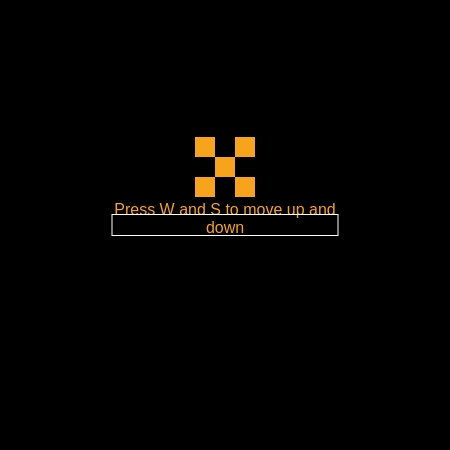
<div id=pixelX style=position:absolute;top:37%;left:50%;transform:translate(-50%,-50%);width:60px;height:60px;display:flex;flex-wrap:wrap>
<div style=width:20px;height:20px;background-color:#f7a31b></div>
<div style=width:20px;height:20px></div>
<div style=width:20px;height:20px;background-color:#f7a31b></div>
<div style=width:20px;height:20px></div>
<div style=width:20px;height:20px;background-color:#f7a31b></div>
<div style=width:20px;height:20px></div>
<div style=width:20px;height:20px;background-color:#f7a31b></div>
<div style=width:20px;height:20px></div>
<div style=width:20px;height:20px;background-color:#f7a31b></div>
</div>
<p id=instructions>Press W and S to move up and down</p>
<div id=loading>
<div id=loading-bar></div>
</div>
<canvas id=pong style=display:none></canvas>
<script>
const canvas = document.getElementById("pong")
, context = canvas.getContext("2d")
, loading = document.getElementById("loading")
, loadingBar = document.getElementById("loading-bar")
, loadingCanvas = document.getElementById("loading-canvas")
, loadingContext = loadingCanvas.getContext("2d");
drawX(loadingContext, 50, 50, 100, "#F7A31B");
let loadingInterval = setInterval((()=>{
loadingBar.style.width = loadingBar.offsetWidth + 5 + "px",
loadingBar.offsetWidth >= loading.offsetWidth && (clearInterval(loadingInterval),
loading.style.display = "none",
document.getElementById("instructions").style.display = "none",
loadingCanvas.style.display = "none",
document.getElementById("pixelX").style.display = "none",
canvas.style.display = "block")
}
), 15);
function setCanvasDimensions() {
const e = .8 * Math.min(window.innerWidth, window.innerHeight);
canvas.width = e,
canvas.height = e
}
setCanvasDimensions();
const paddleWidth = 15
, paddleHeight = 80
, ball = {
x: canvas.width / 2,
y: canvas.height / 2,
size: 20,
dx: 2,
dy: 2
}
, player = {
x: 0,
y: canvas.height / 2 - 40,
width: 15,
height: 80,
dy: 4
}
, computer = {
x: canvas.width - 15,
y: canvas.height / 2 - 40,
width: 15,
height: 80,
dy: 2
};
function drawRect(e, a, t, l, n) {
context.fillStyle = n,
context.fillRect(e, a, t, l)
}
function drawX(e, a, t, l) {
context.fillStyle = l;
const n = t / 4;
context.fillRect(e, a, n, n),
context.fillRect(e + 3 * n, a, n, n),
context.fillRect(e + n, a + n, 2 * n, 2 * n),
context.fillRect(e, a + 3 * n, n, n),
context.fillRect(e + 3 * n, a + 3 * n, n, n)
}
function updatePaddle(e, a, t, l) {
document.addEventListener("keydown", (function(e) {
switch (e.keyCode) {
case a:
l.y -= l.dy;
break;
case t:
l.y += l.dy
}
}
))
}
function update() {
context.clearRect(0, 0, canvas.width, canvas.height),
drawRect(player.x, player.y, player.width, player.height, "#FFFFFF"),
drawRect(computer.x, computer.y, computer.width, computer.height, "#FFFFFF"),
drawX(ball.x, ball.y, ball.size, "#F7A31B"),
ball.x += ball.dx,
ball.y += ball.dy,
(ball.y + ball.size > canvas.height || ball.y < 0) && (ball.dy *= -1),
ball.y + ball.size > player.y && ball.y < player.y + player.height && ball.dx < 0 && ball.x < player.x + player.width && (ball.dx *= -1),
ball.y + ball.size > computer.y && ball.y < computer.y + computer.height && ball.dx > 0 && ball.x + ball.size > computer.x && (ball.dx *= -1),
player.y < 0 && (player.y = 0),
player.y > canvas.height - player.height && (player.y = canvas.height - player.height),
ball.dx > 0 && (computer.y + computer.height / 2 < ball.y ? computer.y += computer.dy : computer.y -= computer.dy),
computer.y < 0 && (computer.y = 0),
computer.y > canvas.height - computer.height && (computer.y = canvas.height - computer.height),
ball.x + ball.size > canvas.width && resetBall(),
ball.x < 0 && resetBall()
}
function resetBall() {
ball.x = canvas.width / 2,
ball.y = canvas.height / 2,
ball.dx = -ball.dx
}
setInterval(update, 20),
updatePaddle("keydown", 87, 83, player),
window.addEventListener("resize", (()=>{
setCanvasDimensions(),
player.x = 0,
player.y = canvas.height / 2 - 40,
computer.x = canvas.width - 15,
computer.y = canvas.height / 2 - 40,
ball.x = canvas.width / 2,
ball.y = canvas.height / 2
}
))
</script>
</body>
</html>#11,527,000text